
Fibre to the Home is now the default way to deliver broadband. It carries every service a subscriber buys — internet, voice, IPTV and Wi-Fi — over a single strand of glass, and it does so with no powered equipment between the exchange and the living room.
This page explains what FTTH is, how a PON is put together, which equipment each part of the network needs, and the parameters that decide whether a deployment will actually work. ANKVI supplies the OLTs, ONTs and field hardware described below.
What is FTTH?
FTTH (Fibre To The Home) means the fibre runs all the way to the subscriber’s home or office, and every service is carried as light. At the customer end an optical network terminal converts that light back into Ethernet ports, telephone ports and Wi-Fi. It is the deepest access layer in the FTTx family — fibre to the cabinet stops at the street, FTTH does not.
The technology underneath is the PON (Passive Optical Network). “Passive” is the important word: between the exchange and the subscriber there is no powered equipment at all. Splitting is done by optical splitters that need no electricity, no cabinet, no cooling and no battery. That single property is what makes FTTH cheaper to run than copper, and it is why the network stays up during a power cut.
| Compared on | Copper access (ADSL / Ethernet) | FTTH |
|---|---|---|
| Medium | Copper pair or Cat cable | Silica fibre |
| Typical bandwidth | A few Mbit/s to a few tens of Mbit/s | GPON 2.5 Gbit/s down / 1.25 Gbit/s up, upgradable to 10G PON |
| Reach | Hundreds of metres to about 2 km | 20 km logical reach |
| Interference | Sensitive to electromagnetic noise and lightning | Immune to EMI, non-conductive, no surge path |
| Operating cost | Many active nodes, power needed in the field, higher failure rate | Passive in the middle, no power or cabinet, low failure rate |
The PON architecture: three building blocks
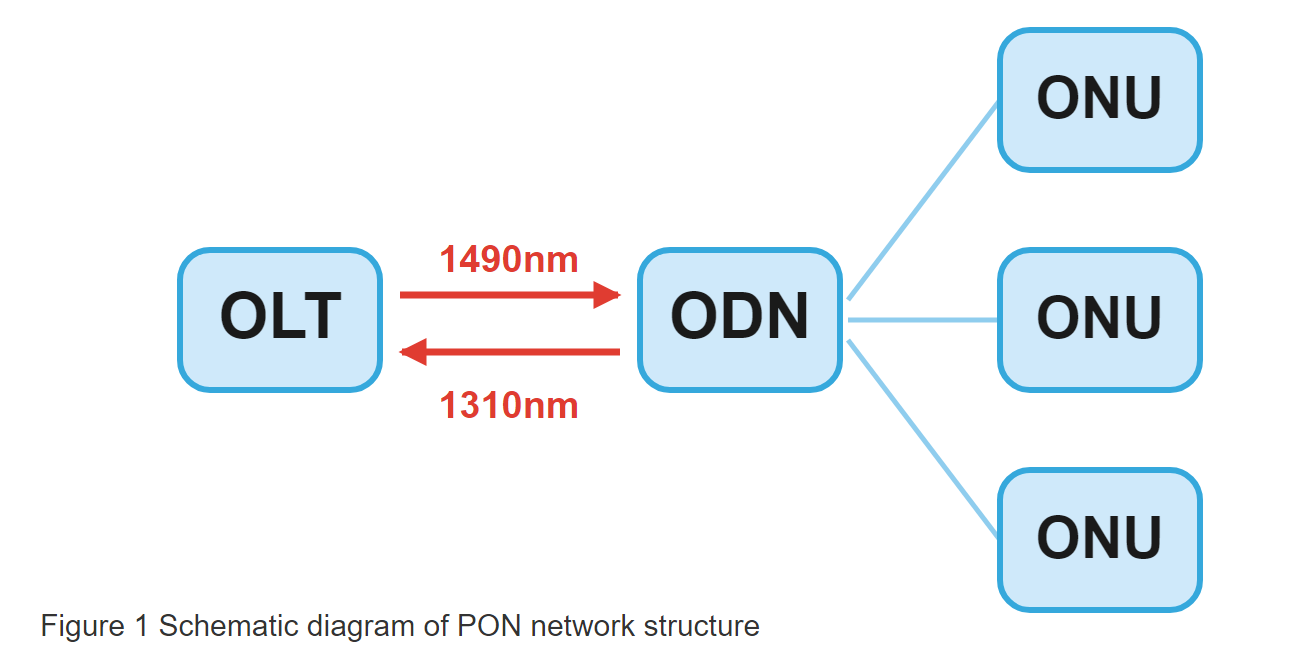
A PON has exactly three parts. Once you can place a device in one of these three boxes, the rest of the network follows.
OLT — the exchange end
The optical line terminal sits in the operator’s site. Uplinks towards the metro network, PON ports towards the subscribers, and it is the intelligence of the whole system: registration, bandwidth allocation, VLAN and QoS, multicast replication for IPTV, and reporting to the management system.
ODN — the passive middle
The optical distribution network is everything between the two ends: feeder cable, optical distribution frame, splitters, distribution cable, fibre access terminals, and the drop cable into the building. No power, no electronics, nothing to fail.
ONU / ONT — the subscriber end
The optical network unit turns light back into services: Ethernet for the router or IPTV box, RJ11 for a legacy handset over VoIP, and Wi-Fi for phones and laptops. The port mix is what distinguishes one model from another.
Why one fibre carries three services
PON separates the directions by colour, so a single strand serves everyone at once:
- Downstream, 1490 nm — the OLT broadcasts to every ONU on the port; each ONU reads only the frames addressed to it.
- Upstream, 1310 nm — all ONUs share the same fibre and transmit in time slots assigned by the OLT (TDMA), so bursts never collide.
- 1550 nm, optional — a separate overlay for CATV video. Three wavelengths share one strand without interfering.
The equipment behind each block
1. OLT: size the ports, then the uplink
An OLT is normally a rack-mounted chassis with line cards. It uplinks to the metro network over GE or 10GE and each PON port feeds tens to hundreds of ONUs through splitters. Three specifications decide the model:
- PON port count — derived from the number of subscribers to be covered, divided by the ONUs you plan to put on one port.
- Uplink capacity — 10GE is the practical minimum for a new build; 1GE fills up faster than expected.
- Multicast and management — IPTV needs efficient multicast replication, and a thin management system makes every later fault expensive.
Our GPON OLT range is compact: the QT7001 with one PON port and the QT7002 with two, both carrying 1×10GE plus 4×GE uplinks for smaller and mid-size builds. The full list sits under GPON OLT.
2. ODN: the splitter is the only active decision
A typical ODN chain runs: feeder cable → optical distribution frame (ODF) → splitter → distribution cable → fibre access terminal → drop cable → ONT. Only the split ratio is a real design choice; everything else is packaging.
The core component is a PLC (planar lightwave circuit) splitter. The larger the ratio, the fewer OLT ports you need, but the less bandwidth each subscriber gets and the shorter the reach:
| Split ratio | Typical insertion loss | Practical use |
|---|---|---|
| 1:8 | about 10.5 dB | Sparse or long-reach areas |
| 1:16 | about 13.5 dB | Residential buildings, balanced design |
| 1:32 | about 17 dB | Dense urban coverage |
| 1:64 | the highest loss of the four | Only with a short ODN and a generous power budget |
Connectors are normally SC/APC — the green angled ferrule — because the angled contact keeps back reflection away from the 1490 nm downstream. Match the whole ODN to APC and do not mix in UPC patch leads.
The field hardware that goes with this stage: rack-mount and pull-out ODFs at the frame end, self-supporting outdoor drop cable or indoor drop cable into the building, airplane-head SC/APC fast connectors for termination in the field, and fibre terminal boxes plus splice closures for the joints. Bulk cable is under Fiber Optic Cable, and mounting hardware under Cable Hardware & Metal Parts.
3. ONU / ONT: pick the port mix, not the highest model
The terminal is where the service becomes usable, so its ports define what the subscriber can buy:
- GE / FE Ethernet — PC, router, IPTV set-top box.
- POTS (RJ11) — a conventional handset carried as VoIP.
- Wi-Fi 2.4 GHz / 5 GHz — phones, laptops, tablets.
- USB or CATV coax — attached storage, or an RF video feed.
Ordering a 4GE + Wi-Fi unit for a single-PC subscriber wastes money on every unit in the project. The two ends of the range make the point: the SG5000 is a single-port 1GE ONT for a basic line, while the SG8161 gives 4GE, POTS, CATV, Wi-Fi 5 and two USB ports for a full-service subscriber. Everything in between is under ONU / ONT.
4. Management, uplink and power
The last group is not part of the PON itself but decides how it is operated:
- EMS — remote provisioning, bulk configuration, alarms and fault location. Without it every truck roll is manual.
- Aggregation and routing — BAS, aggregation switches and routers for authentication, accounting and traffic concentration. See Network Equipment.
- Optical transceivers — the SFP modules that populate the uplink ports. See SFP.
- Power and resilience — PoE switches for access points and cameras (PoE Switch, up to the KU-9048G-6F+ 48-port unit), plus UPS and battery backup at the exchange (UPS & Battery).
For longer metro spans and CWDM/DWDM transport, see DWDM / OTN Solution.
A complete FTTH topology
Figure 2 shows the chain end to end: the internet edge and the EMS connect to the OLT (the figure illustrates an 8 to 64 port unit), the trunk fibre reaches an optical splitter, and fibre then fans out to six different ONT configurations.
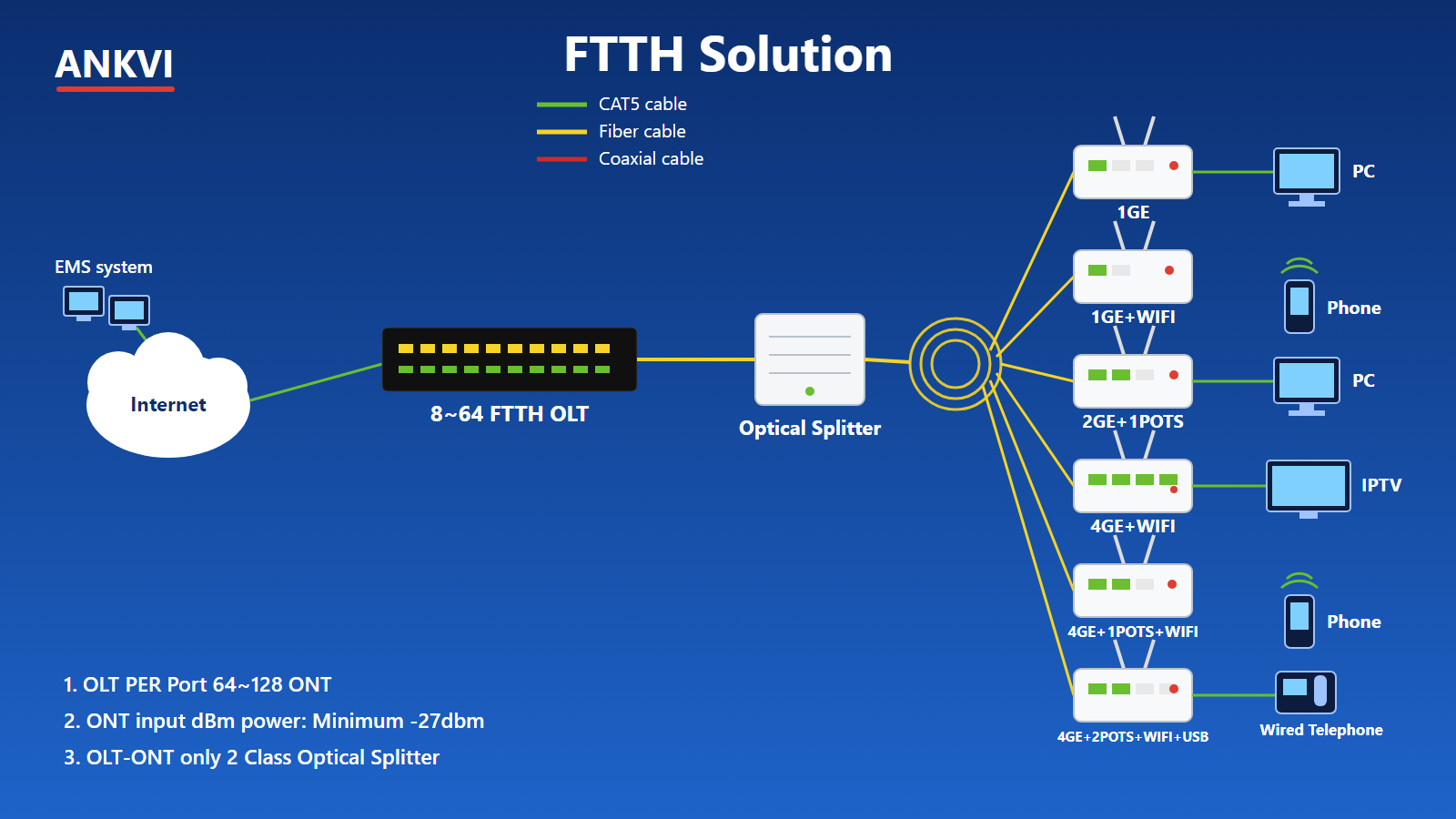
| ONT configuration | Typical subscriber |
|---|---|
| 1GE | A single PC, the most basic residential line |
| 1GE + Wi-Fi | Phones and laptops joining wirelessly |
| 2GE + 1 POTS | Broadband plus one legacy telephone line |
| 4GE + Wi-Fi | Multi-device home or small business, with IPTV |
| 4GE + 1 POTS + Wi-Fi | Internet, voice and full wireless coverage |
| 4GE + 2 POTS + Wi-Fi + USB | Enterprise or premium home: IPTV, two phone lines, storage |
One strand therefore carries four services at once: broadband, VoIP, multicast IPTV and Wi-Fi.
Five parameters to check before deployment
Most FTTH projects that fail do not fail on equipment quality. They fail because one of these five numbers was never written down.
| Parameter | Target |
|---|---|
| Subscribers per PON port | Usually 64 to 128 ONTs, set by split ratio and bandwidth plan |
| ONU receive power | Never below −27 dBm (Class B+, 28 dB budget); aim for −8 to −25 dBm |
| Splitter stages | No more than two between OLT and ONT, e.g. 1:8 + 1:8 = 1:64 |
| Reach | 20 km logical for GPON, confirmed with a point-by-point power budget |
| Wavelength plan | 1490 nm down, 1310 nm up, 1550 nm for CATV — with a qualified WDM combiner |
Measure the receive level at every ONU after installation. A value between −8 and −25 dBm is a pass; a value at the edge means the ODN has a bad splice, a tight bend or a dirty connector, and it will fail in the first rainy season. A handheld PON power meter reading 1310 / 1490 / 1550 nm covers all three wavelengths in one pass, and an OTDR tells you where the loss actually is.
Why operators choose FTTH
Bandwidth that upgrades in place
Moving to XGS-PON or 10G PON reuses the whole ODN. You change the OLT line card and the ONU, not the street.
One site covers the city
A 20 km reach lets a single exchange serve a whole district or a rural township.
Almost nothing to maintain
No power feed, no cabinet cooling and no field electronics in the middle of the network.
Immune to electrical faults
No EMI pickup, no lightning path through the cable, and a service life beyond 20 years.
Services converge
Broadband, voice, IPTV and CCTV backhaul share one fibre and one management system.
Where FTTH is deployed
- Operator FTTH rollouts and copper-to-fibre upgrades
- New cabling for residential estates, apartment blocks and villa developments
- Industrial parks, office buildings and dedicated enterprise lines
- Rural and township universal-service coverage
- Safe-city CCTV backhaul and smart-community networks
Selection and deployment advice
- Count ports before choosing an OLT. Subscribers divided by ONUs per port gives the port count; keep 10GE on the uplink regardless.
- Keep the split plan moderate. 1:16 or 1:32 for dense areas, 1:8 where subscribers are spread out, and never more than two stages.
- Match the ONT to the service, not to the catalogue. 1GE for internet only; add POTS or 4GE only when the subscriber actually buys voice or IPTV.
- Measure optical power at every ONU. −8 to −25 dBm is the acceptance window; record it per address.
- Deploy the EMS from day one. Remote provisioning and fault location remove most of the field labour.
Start with these
The parts of a typical first build, in the order they are installed.
QT7002 — 2-port GPON OLT
2 PON ports, 1×10GE and 4×GE uplink. The exchange end of the network.
GJYXCH — outdoor drop cable
Self-supporting 1–4 core drop cable for the run from the pole to the building.
ODF.051 — 12-core terminal box
Pull-out SC/APC termination point for a small distribution area.
EX39 — handheld fusion splicer
8-second splicing in a 1.06 kg body, for field joints and repairs.
SG8161 — full-service ONT
4GE, POTS, CATV, Wi-Fi 5 and 2 USB: the top of the subscriber range.
AOF500 — PON power meter
1310 / 1490 / 1550 nm in one handheld, for acceptance testing at each ONU.
Planning a rollout?
Send us the coverage area, the number of subscribers and the services you intend to sell. We will come back with a port count, a split plan and a bill of materials with the optical power budget worked through.